EX File Manager
Tools
| App Name | Smart IR Remote |
|---|---|
| Latest Version | v.4.2.1 |
| Publisher | RockeshTech |
| Category | Tools |
| Google Playstore | com.rockeshtech.smart_ir_remote |
Smart IR Remote – Universal Remote Control for TV, AC, Set Top Box & More
Turn your Android phone into a powerful universal remote control with Smart IR Remote. If your phone has a built-in IR blaster (Infrared transmitter), you can control compatible electronic devices directly from your mobile without needing an additional remote.
Smart IR Remote is designed to provide a fast, simple, and reliable remote control experience for everyday devices including TVs, air conditioners, set-top boxes, projectors, speakers, audio systems, DVD players, and more.
Whether you lost your remote, need a backup remote, or want all your remotes in one place, Smart IR Remote helps you control compatible devices from a single app.
Key Features
✅ Universal IR Remote Control
Control compatible devices using your phone’s built-in IR blaster.
✅ TV Remote Control
Use your Android phone as a TV remote for supported television models.
✅ AC Remote Control
Manage temperature, fan speed, power, swing mode, and other available air conditioner functions on supported devices.
✅ Set Top Box Remote
Control supported DTH and cable set-top boxes with easy navigation and channel controls.
✅ Projector Remote
Operate compatible projectors directly from your phone.
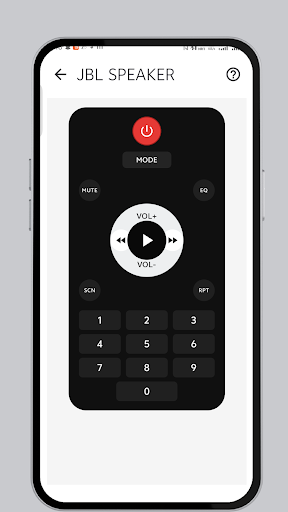
✅ Audio System Remote
Control supported speakers, home theater systems, amplifiers, and audio equipment.
✅ DVD & Media Device Control
Manage supported DVD players and media devices.
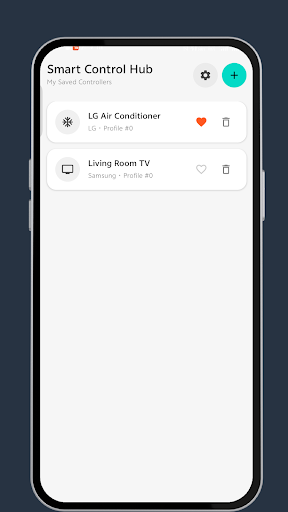
✅ Favorites Management
Save frequently used remotes for faster access.
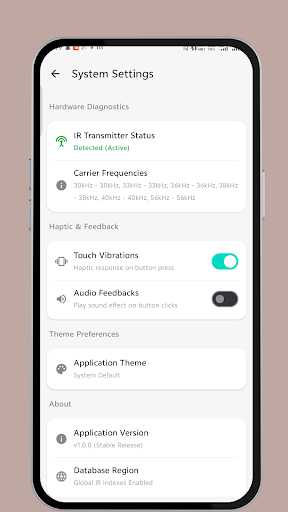
✅ Haptic Feedback
Enjoy responsive button interactions with vibration feedback.
✅ Modern User Interface
Clean, lightweight, and user-friendly design for smooth operation.
✅ Fast Performance
Optimized for speed, reliability, and low battery consumption.
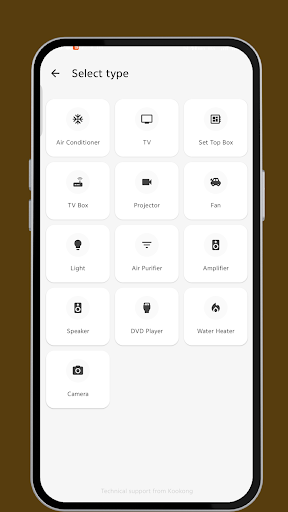
Supported Device Categories
• TV Remote Control
• Air Conditioner Remote
• Set Top Box Remote
• Projector Remote
• Audio System Remote
• Home Theater Remote
• Amplifier Remote
• DVD Player Remote
• Media Device Remote
• Other Compatible IR Devices
Why Choose Smart IR Remote?
✔ Easy setup and quick access
✔ Lightweight and fast app performance
✔ Convenient replacement for physical remotes
✔ Multiple remote categories in one app
✔ Clean and intuitive user experience
✔ Designed for phones with built-in IR blasters
✔ Useful as a backup remote anytime, anywhere
How It Works
Open Smart IR Remote.
Select your device category.
Choose a compatible remote profile.
Point your phone toward the device.
Start controlling your device instantly.
Important Note
Smart IR Remote requires an Android phone with a built-in IR blaster. Devices without infrared hardware cannot transmit IR signals.
Compatibility may vary depending on your phone model, device manufacturer, and supported infrared protocols.
Perfect For
• TV Remote Replacement
• AC Remote Replacement
• Universal Remote Control
• Home Entertainment Control
• Smart Home Convenience
• Backup Remote Solution
• Daily Device Management
Download Smart IR Remote today and enjoy a simple, fast, and reliable universal remote control experience directly from your Android phone. Control your TV, AC, Set Top Box, Projector, Audio System, DVD Player, and other compatible IR-enabled devices with ease.